Top 10 IT Software companies in Vizag
Posted on January 02, 2026
![What is Webflow [Should you Use it Over WordPress]](https://www.helpingcontent.com/wp-content/uploads/2025/12/What-is-Webflow-Should-you-Use-it-Over-WordPress.webp)
Whenever the majority of the population considers developing a site, they start imagining the use of a computer and code or the need to employ costly programmers. However, today the process is simplified by the help of the website builders. Some of the most popular tools among them are Webflow and WordPress.
And in case you are wondering what is webflow and how it is more suitable than WordPress, you will find the answers in this comprehensive guide, which covers everything from the fundamentals of the field to practical aspects of the practice.
Webflow is fundamentally a visual creation tool that allows users to design, create, and publish websites without prior coding experience. You build the website on the screen just the same way you can draw the website in software such as Figma or Canva, except that you can actually build a functional webpage beneath the design.
Webflow also allows you to do everything with layout, color, font, animation, and structure of the page, and finally, clean code is produced automatically in the background.
This is one of the reasons why designers, freelancers, agencies, and startups enjoy it; they are free to develop it, but it does not require a developer to make the minor modifications.
It has an in-built capability of creating landing pages, portfolios, business websites, blogs, and even CMS driven content websites.
Here’s how Webflow works and why developers use it for development
You design visually and add objects like the text, pictures, buttons, grids, parts, and boxes. Every single item is customizable in regard to the way that it looks, spacing, alignment, borders, shadows, and even animations.
Webflow employs the real web structure concepts, such as:
This gives you creative freedom while still keeping the site professional and responsive.
In case you require blogs, portfolios, listings, or any dynamic content, the CMS allows you to create collections of content and maintain them as simple content, without needing any type of plugins or database configurations.
When your design is complete, you can use Webflow’s powerful and secure hosting to host the site and publish it in one click. No dedicated hosting environment, no patches of any kind, no self-service updates.
WordPress is an open-source free web hosting platform and is numerous in the world. It drives millions of blogs, business websites, online shops, news websites, and so on.
There are two versions:
WordPress is operated on a thematic or plug-in basis:
It is strong and scalable; however, it is more technical and demands greater expertise, particularly during updates, security, and backup, as well as optimization of its performance.
The comparison of the two platforms in the real-world use is as follows:
| Feature | Webflow | WordPress |
| Ease of Use | Visual editor | Theme & plugin-based |
| Design Control | Very high | Medium to high |
| Coding Required | No | Sometimes |
| Maintenance | Minimal | Requires regular updates |
| Hosting | Built-in | Separate hosting needed |
| Best For | Designers, portfolios, business sites | Blogs, large content sites, and ecommerce |
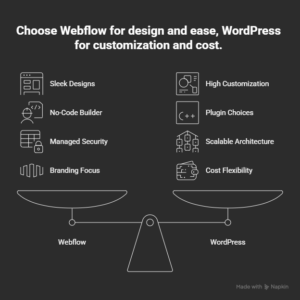
Choose Webflow if:
It is best used in websites of businesses, landing pages, personal branding websites, portfolios, agency websites, and the marketing page of SaaS websites.
WordPress is a better fit if:
It is also among the most powerful platforms for long-term content and high sites.
No single best platform exists, but rather it will depend on what you want to accomplish. Webflow is a great solution to have a design-friendly and low-maintenance, visually flexible platform.
WordPress might be a better fit in this case, depending on what you need, like content scalability, plugins, or any type of customization by creating it.
In a way that is simple to comprehend, what is Webflow, it is simplified when one views it as a visual, modern option to conventional website creation, especially to those people who respect design control without needing to write a single line of code.
Webflow and WordPress are both strong platforms, yet the correct solution depends on your requirements. Webflow can be chosen when you intend a visually fine, no-code website builder, having the least amount of care, while WordPress can be chosen when you intend a blog, large content site, and full control over customization.
In other words, the point made is that when you know what Webflow is, then it becomes obvious that it is a design-oriented and modern substitute to a regular website platform.
Yes, in case you enjoy visual designing, and you do not want to deal with any plugins or technical arrangements. WordPress is favored in sites that require high content or those centered on blogs.
No, it is not a coded platform, but it uses no-codes so that you can ease yourself into thinking about the basic building concepts of the web.
Yes, Webflow CMS is capable of blogging, and WordPress has more blogging features and integrations.
WordPress may be less expensive at the beginning, yet it may be highly expensive because of plugins, developers, and maintenance. Webflow might be more expensive in the short term and less daunting to maintain in the long term.

Helping content is a content write who loves to right about the Technology, Home Decor, and Sprituality. When he is not writing he might be doing skydiving.

Posted on January 02, 2026

Posted on January 01, 2026

Posted on December 31, 2025